Actualizaciones del SDK para iOS
Read about the most recent iOS SDK updates
Last updated:
January 19, 2024


SDK iOS v1.18.0
- Introduction of the Replay badge icon, also known as the "Recorded" tag, for replays. Users now have the flexibility to toggle this feature on and off at their discretion.
- Countdown Timer feature has been enhanced to include a "Remind Me" functionality. This enables our valued customers to seamlessly integrate important events into their calendars, ensuring they never miss a scheduled live session.
SDK iOS v1.16.0
- Optimization of thumbnail image fetching
- Implementation of a player wrap to prevent potential retain cycles that may occur when integrating with various SDK delegates
- Empowering the host app with the ability to pause the player before video playback begins
SDK iOS v1.15.0
- Users can now show a logo in place of the ellipsis button on the player
- Product card is almost completely customizable
- SDK will now hide the price based on the setting in biz portal
- View count can now be disabled based on the setting in biz portal
SDK iOS v1.14.0
- Dropped support for iOS 12
- UI updates to make video details options look more symmetric when only one item is in the options
- Adjusted the way our feed is constrained to better support our feed being used in Swift UI.
- Fixed an image fetching issue reported by Afterpay
SDK iOS v1.13.0
- New play/pause API to allow host app programmatic control over player playback
- Announcement banners
- Continual improvements to the PDP screen
SDK iOS v1.12.0
- New Product Card design Product Card in short video
- Presenting a fresh product detail page with improved visuals and functionalities.
- Offering an API to easily configure StoryBlock for seamless integration.
- Empowering users to customize the images of full-screen player buttons for a personalized touch
- Providing the capability to define custom navigation handling when tapping on a product card
- Introducing an API to toggle the visibility of the video title on the detail section page, enhancing user control.
- Introducing a new content source for single video or livestream, enriching Video Feed and Storyblock
SDK iOS v1.11.0
- Gracefully handle up to 'hard' load test during live stream
- Support custom handling the cart icon click event by host app developers
- When users click the cart icon, SDK can deliver the click event to the host apps and allow the host app developers to custom handle the event
- Send WebSocket Channel connects and disconnects to diagnostics
- Ability to set single video id as source in Storyblock on Mobile SDKs
- Ad configuration Implementation “Kill Switch”
- Supports opening the video player in full-screen mode and enabling PiP(including the floating player)
- support opening the video player in full-screen mode and enabling PiP(including the floating player)
- Update the button state and request the configuration update when the shopping CTA action is none
- Adding Poll in Short Videos
- Update AV Player
- Mute Button Parity Issues
- SKU Feed Query
- Release IVS liv for SDK v.1.10
- Release Agora supporting lib
SDK iOS v1.10.0
- Implement Initial Player Layout
- Traffic Source Tracking
- Fullscreen+Impressions+creative_view (VAST)
- ‘Select Replay’ feature being reflected on SDK
- 'Select Replay' feature in FW dashboard allows us to choose from which moment users will see the video being played when opening the stream.
- Mainly used to cut off beginning of stream when there is a countdown/waiting
- Add IVS supporting library to Package.swift
- Add IVS supporting library within the new package
- Automation continues to work
- Add GAM supporting library to Package.swift
- Add GAM supporting library within the new package
- Automation continues to work
- ADD IMA supporting library to Package.swift
- Add IMA supporting library within the new package
- Automation continues to work
- Replace Existing CTA for Short Videos
- Replaces existing CTA button with a bigger (“full” width) CTA button
- Agora v0.4.1
- Latest Agora supporting lib
- User Engagement Tracking
- Track users Last Engagement
- Update IVS Player supporting lib
- Send Player error events during live streams
- Send Player buffering ratio to diagnostics
- Send Player resolution to diagnostics
- Send video startup time to diagnostics
SDK iOS v1.9.0
- ChatUX Changes
- Collapsed and Expand Modes for the Chat
- Lighter gradient in the background
- Missed messages button
- Messages fading out on the top of chat
- Better UI support for smaller Storyblock implementations
- Easier integration of supporting libraries
- Hashtag Playlist
- Bug Fixes
SDK iOS v1.8.0
- WCAG Phase 2 Release
- The purpose is to help with all the Accessibility issues related to our iOS SDK
- Shop Now Feature
- With our current Product Card, once a user clicks on Product card instead of just “Add to Cart” CTA will give them the option to change text to say “Shop Now”
- Once clicked, along with the product variant details, Shop Now Call To Action Button is visible
- Applies to both Livestream and Short Videos
- Click Handler
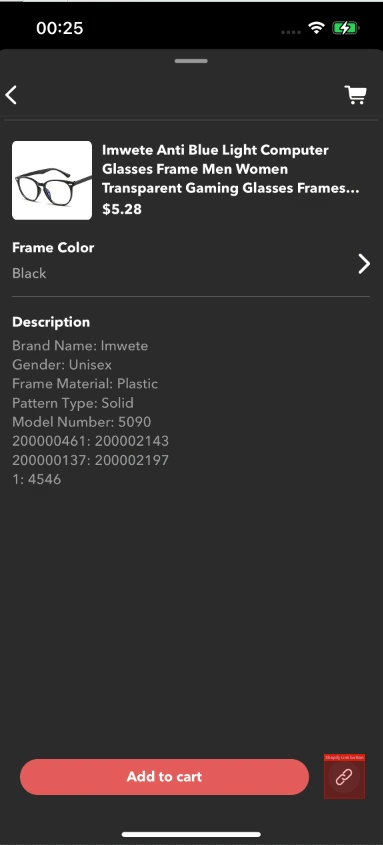
- Allows the host app to redirect the user to the app page for the product upon clicking the link icon next to Add to Cart button on Product Cards
- Product ID
- Unit ID
- La URL asociada: el controlador debe proporcionar el objeto del producto para que la aplicación anfitriona obtenga la URL o el ID del producto para navegar a la página del producto.
- Allows the host app to redirect the user to the app page for the product upon clicking the link icon next to Add to Cart button on Product Cards
- Hacer que se pueda hacer clic en las URL
- Permite hacer clic en las URL enviadas en un chat por el moderador o en los mensajes anclados
- Los usuarios serán redirigidos al enlace en lugar de tener que copiar y pegar el enlace
- No se podrá hacer clic en un usuario normal que publique un enlace
- Solo se podrá hacer clic en los enlaces enviados por el moderador
- La biblioteca compatible con iOS Agora para SDK ya está disponible y es pública
SDK iOS v1.7.0
- Se actualizó la marca Firework en nuestro SDK
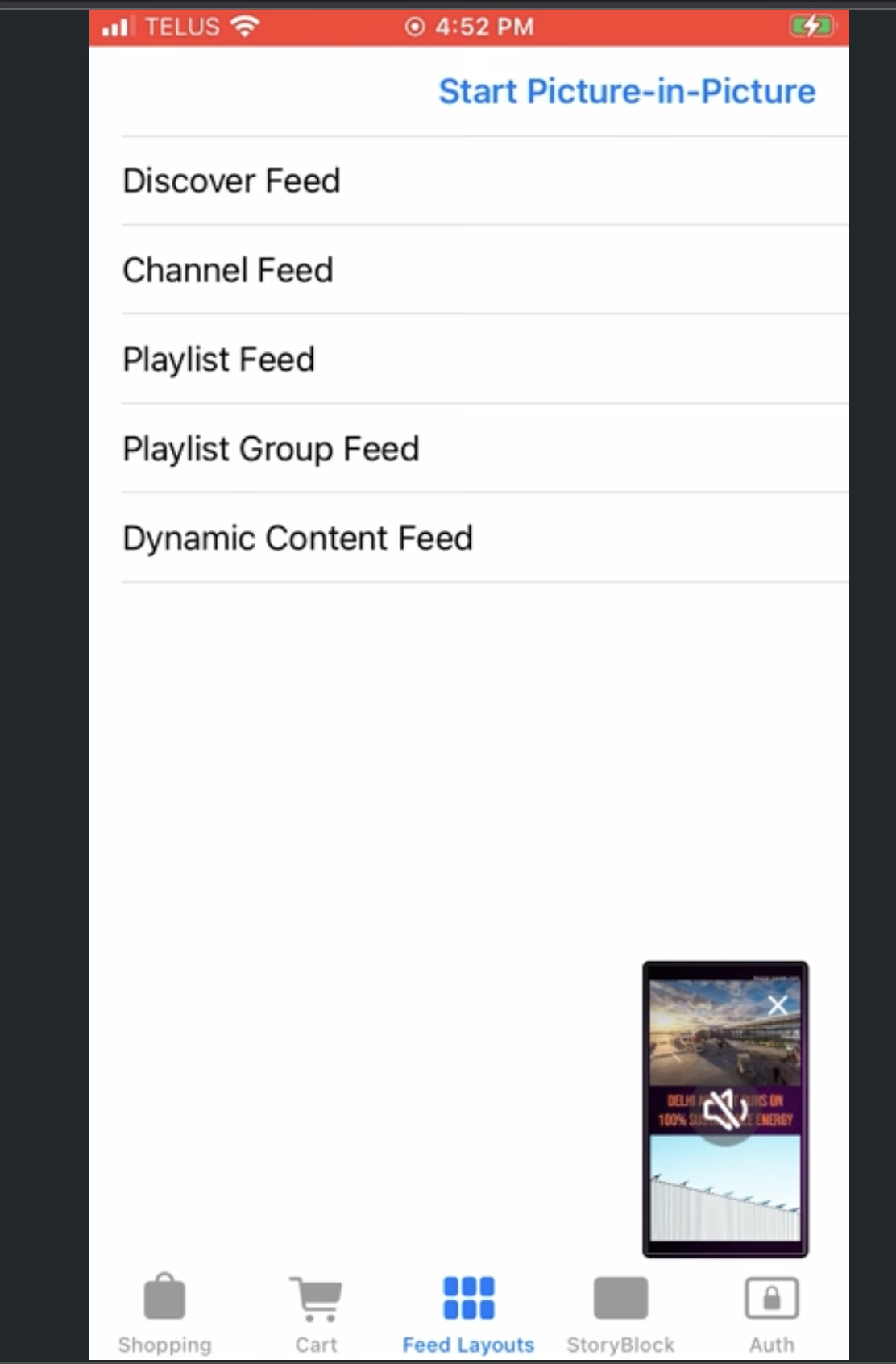
- Agregue la capacidad de ingresar programáticamente a un reproductor flotante
- El usuario puede navegar hacia los detalles del producto y la página de pago sin perderse el vídeo que se está reproduciendo
- Ofrece a los usuarios una API que pueden usar para poder ingresar al reproductor flotante
- Añadir actualizaciones mínimas de ADA para Player
- Cumplimiento para personas con discapacidades especiales
- Se agregó navegar por el video «siguiente» y «anterior» usando botones que apuntan hacia la derecha y hacia la izquierda
- Ocultar enlace junto al botón Añadir al carrito
- Permite a los usuarios ocultar el enlace junto a la función Agregar al carrito
- Cuando el enlace esté oculto, el botón llenará el espacio disponible
- El SDK tiene una configuración que ocultará este enlace independientemente de si existe o no.
- El cliente puede configurar si este enlace está visible con la configuración
- La configuración predeterminada es visible
SDK iOS v1.6.0
- Soporte mejorado para jugadores flotantes - Mejora de nuestra API que permite a nuestros socios habilitar el reproductor/PiP flotante con una sola bandera. El SDK hace toda la administración de recursos por ellos.
- Configuración de retardo destacada de CTA - El reproductor tiene una nueva configuración que permite al desarrollador especificar cuánto tiempo pasará antes de que el botón esté completamente visible.
- Mejoras y correcciones de errores en Floating Player