Fireworkカメラアプリでのビデオコンテンツの管理
ビジネスポータルと同じ機能を、Fireworkカメラアプリ1つでまとめて活用できます。
Last updated:
August 20, 2025


ビデオ管理オプション
ステップ1
Fireworkカメラアプリを開きます。
ステップ2
画面左下にある「Your Content」タブをタップすると、動画の管理を開始できます。
※iOSおよびAndroidで利用可能です。
コンテンツの作成とアップロード
ステップ1
右上の「+」アイコンをタップして、以下のオプションから選択します。
- ライブ配信を開始する
- プレイリストを作成する
- ショート動画をアップロードする
- ショート動画を作成する
- ライブストリームイベントを作成する
- ライブストリームイベントをSNSに同時配信する

コンテンツを管理
Fireworkカメラアプリでは、以下を管理できます。
- プレイリスト
- ライブストリームイベント
- コンテンツの絞り込み・検索
- 動画メタデータの編集


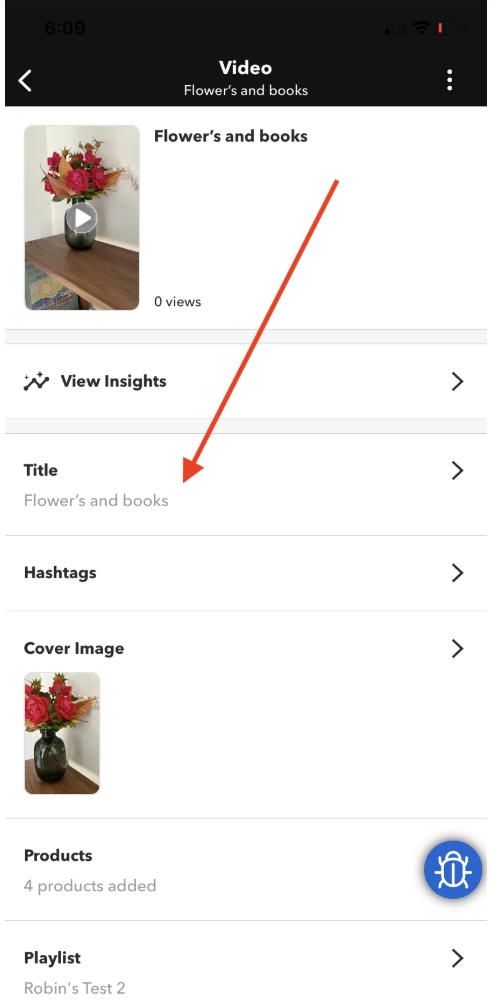
エンゲージメントをトラッキング
各動画の詳細セクションで「インサイトを表示」をタップすると、エンゲージメント指標を確認できます。

注記
ビジネスポータルでの変更内容は、カメラアプリとの間ですべて自動的に反映されます。