Add a Widget in Adobe Commerce Cloud
Learn how to add a widget and insert Firework videos into your storefront.


Pattern 1: Using Widget Insert
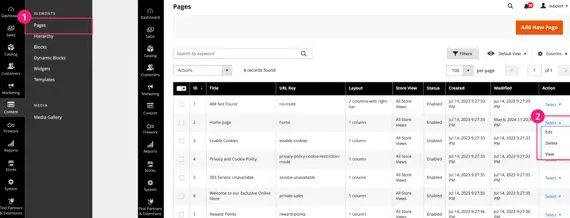
Step #1
Go to Content -> Pages.
Step #2
Select Edit on the page you want.
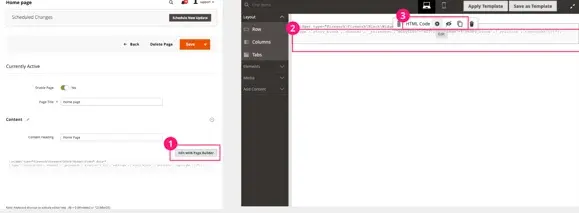
Step #3
Choose Edit with Page Builder.
Step #4
Add an HTML Code block where you want to embed the widget.
Step #5
Click Edit (⚙).
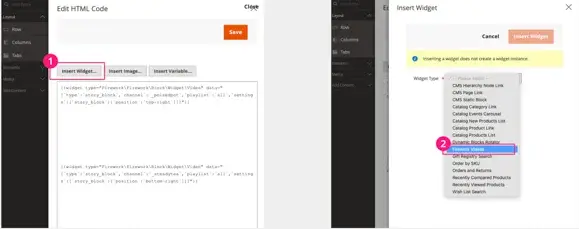
Step #6
Select Insert Widget and choose Firework Videos.
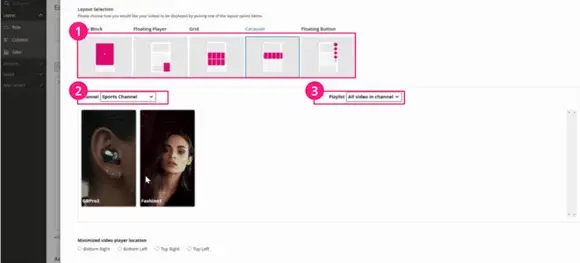
Step #7
Choose layout, channel, and playlist, then click Save.
Pattern 2: Using HTML Code
Use Pattern 1 for simple embed without coding (limited customization).
Use Pattern 2 to customize layout, size, titles, etc. (requires HTML knowledge).
Step #1
Get HTML code from Firework Dashboard → Playlist/Layout.
Step #2
Paste and edit the HTML code in the content section.
If you would like to implement Product/Cart Hydration you will need to add the following script:
<script async type="text/javascript" src="//asset.fwcdn3.com/js/integrations/magento.js"></script>
Show Multiple Playlists Avoid script duplication by using only fwn.js, which includes logic from storyblock.js and embed-feed.js.