Registro de cambios de compras virtuales uno a uno
See the latest updates and developments to One-to-One Virtual Shopping.


December 2025
Background Blur for OTO Calls
Agents can now blur their video background during live calls for added privacy and a more professional experience.
Helpcenter : Link
Sept, 2025
Transferring Visitor Conversations to Another Feed
Agents now have the ability to transfer active visitor conversations to another feed. This makes it easier to route visitors to the right agent or team without ending the existing conversation.
Help center resources - Link
June 12, 2025
Agent Timesheet Overview
The Agent Timesheet feature provides a detailed view of each agent’s online presence and interaction history. It helps Admins and team members monitor agent availability and engagement over a selected time frame.
- Help center resources - Link
May 9,2025
OTO Navigation for Mobile is Live!
✨ What's New:
Agents can now search for products directly on mobile and send visitors they’re chatting with straight to the product page—making it faster and easier to guide customers to what they’re looking for.
- Mobile-friendly product search interface for agents
- Quick link sharing directly in conversations
- Seamless transition from chat to product page for visitors
May 5,2025
- Customizable menu image
Brands (admins only) can now replace image in the OTO widget menu picture with their own image
Help center resource - Link - Multiple office hours time slots
Businesses can now have multiple time slots in their OTO time availability to account for breaks during the day (available from 9am-12pm then 1pm-5pm, etc)
Help center resource - Link
- Agent notes
Agents will be able to leave notes about conversations, which will be viewable in the chat history feature.
Help center resource - Link - Conversation history
Business admins can now view and download chat logs and recordings in the FW business portal.
Help center resource - Link
April 15,2025
CallKit-Powered Calling Experience in Camera App
- The new CallKit-powered calling experience is now live in the Camera App!
- This update brings a more native, streamlined calling experience for agents, ensuring faster response times and better coordination when handling visitor calls.
- Here’s a quick guide to the new experience — Link
April 3,2025
Draggable Widget
When the OTO widget is minimized into a rectangle, visitors can now drag and drop it across the page for better usability
Note: widget is only draggable during calls
Jan 28,2025
- The Agent Online Hours Dashboard will allow admins to view the hours agents have been online over the past few days.
Dec 12,2024
Portal App Download: OTO is now available for download on both Windows and macOS.

Dec 7,2024
Scheduling with Calendly - This features allows you to schedule and manage meetings effortlessly with Calendly(OTO), making it easy for visitors to book and attend
Help center resource -Scheduling with Calendly (OTO)
Oct 29,2024
Widget menu description - Under OTO -> Settings-> configuration you can now customise the widget description
Call Duration Counter - This feature indicates the length of an ongoing call. The timer starts when the agent picks up the call or when they initiate a call to a visitor.
Sep 24,2025
Customizable Offline widget content - Allows users to personalize visibility in offline widgets, addressing the limitations of current solutions for an enhanced offline experience.
Help center resource -OTO Customizable Offline Widget Content
Sep 24,2025
Widget Positioning Revised
Streamlined the process for configuring the position of your One to One widget. You can now effortlessly customize the OTO widget's placement on your webpage directly from the settings page.

Sep 11,2024
Multi- chat on Mobile App - To enhance connectivity and maximize interaction opportunities, we now support multi-chat functionality, enabling agents to manage multiple conversations concurrently.

Help center resource - Multi-Chat with One to One Virtual Shopping on Mobile App
Shopify Instruction page updated
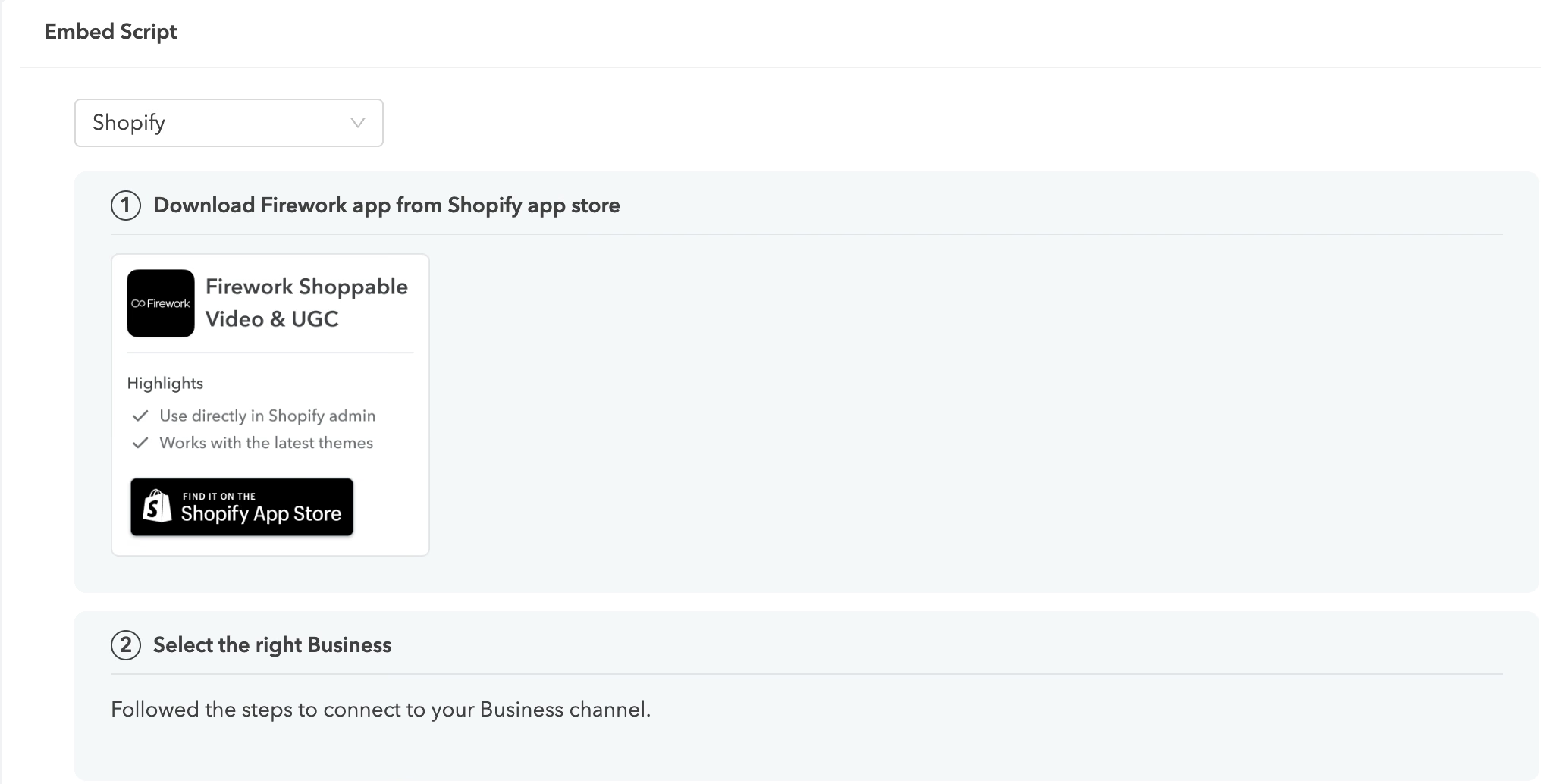
Aug 28,2024
New call ringtone - when you receive an incoming call from visitors.
Aug 21,2024
Visitor Camera Access - Ensure camera access are released when relevant
Block Visitor - Shadow ban visitor to stop unpleasant experience
July 16,2024
Customisable waitlist message - You can now set your own message when the visitor enters the waitlist queue

Help center resource - Add One-to-One Customizable Waitlist Message
Work Hours - Admin can configure the availability hours of the 1:1 widget so visitors see when it's available to call

Help center resource - Set One to One Agent Work Hours
Widget offline mode - You can now display scheduling options and work hours depending on the configuration.
June 24,2024
Text snippets:
- Agent can use a shortcut phrase to access a templated message, helping address repetitive messages sent via text!
- Type a phrase and the message you want to select will appear.
- Help center resource - How to Configure Text Snippets
June 11, 2024
Widget Visibility Settings - Within the 1:1 dashboard, admins can set who can view the widget based on location or URL. Allowing more control without the need to adjust the embed script.
Help center resource - Set One to One Widget Visibility
May 29,2024
- Auto-Message Trigger - Upon a new visitor viewing the One to One widget, a automated message template will trigger to engage the user without the need for agents to manually do first outreach.
- Help center resources -Auto - message trigger

- Avatar display in waitlist - coming soon - Display the avatar image for a visitor waiting in the waitlist
- NPS Adjustments - Coming Soon - visual changes to the NPS for visitors to complete at the end
May 21,2024
- Admin Panel - View for admins to see agents status for who is active and online
- Setting Page redesign - adjusted options within, we will list this on the release doc

- Missed call label on Inbox - For agents inboxes, they will see an icon whenever they missed an incoming call.
May 20,2024
Team Dashboard - Offer real time insight for managers to see when your agents go online and at what time.

Settings Updates - Made adjustments to the options for setting up your One to One widget. See our article here.
April 22,2024
New request metrics tab to OTO insight
Offer detailed insights into request acceptance rates and the origins of these requests, enabling brands to analyze and collaborate more effectively with their agents.

April 19th 2024
Multi-Chat - Allow Agents to start multiple chat threads and keep an active inbox for visitors they've recently engaged with.
Help center resource - Multichat with OTO
Capacity Setting - Underneath Settings, you can set a capacity on the widget, once the waitlist reaches a certain point. You can then choose to show a "agent is occupied message", a scheduling link or hide the widget automatically once the limit is reached.

March 21, 2024
Live Feed Support in SA App - Agents are able to subscribe to and manage feeds via the mobile app.

March 11,2024
Calendly Scheduling - Link your Calendly to the Scheduling option for a shopper to open up into your Calendly booking page.

Feb 6th,2024
File upload - Support file uploads from both the Agent and the visitor in a chat! To see more visit the instructions here.
Scheduling - Display an option for a visitor to schedule a future callback (leveraging a link out option). You then can use your callback choice to connect with the visitor however you'd like. This
This can be set up in the Settings page under Integrations.

Jan 12,2024
- Sales Agent Mobile App - Now agents can leverage our mobile app to support chats and calls while on the move! See instructions here on how to do so.
- Live Feeds - Updated design to One-to-One Workspace. Now support list views which can be preconfigured to display specific views by categories such as:
- URL Pattern = specific pdp, search term?
- Device type
- Geo location - IP based
For instructions on how to set up, please see here.
Jan 4,2024
Missed Call Label - Now display a missed call label when a visitor calls and no agent responds. This will display until an agent engages in a conversation with the visitor or the visitor leaves the site.

Dec 11,2023
Block Visitor - On the visitor detail page, you will have the option to block and unblock visitors. When a visitor is blocked, they will be moved to the bottom of the feed and their profile will appear greyed out. Blocked visitors will not trigger any notifications for calls or messages.
Dec 5,2023
Waitlist - When a visitor contacts the agent, they will be put on a waitlist where they will see which line in the queue they are in until connected with an agent. The changes are listed below:
- When a visitor fully clicks open the widget, a message will display in the chat telling them they are in queue:

- If the visitor minimizes the one-to-one widget, then a number will display for their queue
- Once connected to an Agent, a message appears saying “You are connected to agent [name]” and the call or chat will begin!
11 de octubre de 2023
Icono de agente - Al enviar un mensaje de texto proactivo, aparecerá una imagen del agente junto al mensaje.

Para configurarlo, añada su imagen a través del «Perfil» del Portal empresarial. Se pueden encontrar instrucciones aquí.
24 de octubre de 2023
Barra de notificaciones = Desde la vista de detalles de los visitantes, ahora puedes ver los mensajes de texto o las llamadas entrantes directamente en la parte superior de la página. Qué se mostrará:
- Mensaje de texto entrante único = Un identificador de invitado y la opción de acceder directamente al chat.

- Llamada entrante única = un identificador de invitado y la opción de acceder directamente a la llamada.

- Varios mensajes de texto o llamadas entrantes = Se muestra una opción de visualización que lleva al agente a la lista completa de clientes.

**Si está en una sesión activa, se le pedirá que finalice la sesión antes de pasar al nuevo visitante.
**Si otra SA acepta la conversación entrante antes que tú, aparecerá un mensaje que te impedirá cambiar porque otro agente ha entrado en la conversación.
12 de octubre de 2023
- Nuevo diseño de vista previa de mensajes =Pequeño, más auténtico (usaremos el avatar del agente) y se agregó el elemento «en línea ahora».
- Indicador en línea en el widget = se ha añadido un punto verde en la portada del widget para indicar que los agentes están actualmente en línea.

3 de octubre de 2023
- Enlace en el que puede hacer clic = Los clientes ahora pueden hacer clic en las URL que se envían por texto en un chat.
- Puntos de entrada = Capaz de configurar compras virtuales individuales en cualquier lugar, como una CTA, una CTA por correo electrónico, un vídeo corto o incluso una CTA publicitaria. Ver eslabón haga clic aquí para obtener más información.
22 de septiembre de 2023
- Conmutador de visibilidad de compras virtuales uno a uno = El widget de compras virtuales individuales solo se activará para aparecer cuando el agente de ventas haya indicado que está en línea al cambiar el estado de línea a ACTIVADO. Si se desactiva, se ocultará el widget 1:1.

12 de septiembre de 2023
- Indicador de escritura = El agente de ventas verá si la otra cara está escribiendo actualmente y aparecerá un «...» como se muestra a continuación:

- Consejos visuales en la lista de visitantes = Aparece un emoji 🐔 junto al nombre del huésped para que sea más fácil escanear y encontrar a la misma persona, igual que el ID del invitado, los emojis son los mismos cada vez para el mismo huésped.

- Mensaje Wiggle = Cuando el agente de ventas envía un mensaje, la vista previa del mensaje cambiará después de cierto tiempo para captar la atención de los clientes.