1対1のバーチャルショッピング変更履歴
1対1バーチャルショッピングの最新のアップデートや変更内容をご確認いただけます。


2025年12月
OTO通話の背景ぼかし(Background Blur for OTO Calls)
ライブ通話中にエージェントが自分のビデオ背景をぼかせるようになりました。プライバシーの確保と、よりプロフェッショナルな印象を与えることができます。
2025年9月
訪問者の会話を別のフィードへ転送(Transferring Visitor Conversations to Another Feed)
エージェントがアクティブな訪問者との会話を別のフィードへ転送できるようになりました。既存の会話を終了せずに、適切なエージェントやチームへルーティングしやすくなります。
ヘルプセンターリソース:訪問者の会話を別のフィードに転送する
2025年6月12日
エージェントタイムシート概要(Agent Timesheet Overview)
エージェントタイムシート機能は、各エージェントのオンライン状況とインタラクション履歴を詳細に表示します。管理者やチームメンバーが、選択した期間のエージェントの稼働状況とエンゲージメントを把握するのに役立ちます。
- ヘルプセンターリソース:エージェントタイムシートの概要
2025年5月9日
モバイル向けOTOナビゲーション(OTO Navigation for Mobile is Live!)
✨ 新機能:
エージェントがモバイル上で直接商品を検索し、チャット中の訪問者に商品ページのリンクを即座に送信できるようになりました。顧客を目的のページへより素早く案内できます。
- エージェント向けのモバイル対応商品検索インターフェース
- 会話内でのクイックリンク共有
- チャットから商品ページへのシームレスな遷移
2025年5月5日
- カスタマイズ可能なメニュー画像:管理者はOTOウィジェットのメニュー画像を独自の画像に差し替えられるようになりました。
- 複数の営業時間スロット:OTOの営業時間設定に複数のタイムスロット(例:午前9時〜12時、午後1時〜5時など、休憩時間を考慮した設定)が追加できるようになりました。
- エージェントメモ:エージェントが会話についてのメモを残せるようになりました。チャット履歴機能から確認できます。エージェントメモ
- 会話履歴:ビジネス管理者がFWビジネスポータルでチャットログと録画を閲覧・ダウンロードできるようになりました。
2025年4月15日
CallKit搭載の通話体験(CallKit-Powered Calling Experience in Camera App)
- 新しいCallKit搭載の通話体験がCamera Appで利用できるようになりました。
- このアップデートにより、エージェントにとってよりネイティブでスムーズな通話体験が実現し、訪問者の通話への応答速度と連携効率が向上します。
2025年4月3日
ドラッグ可能なウィジェット(Draggable Widget)
OTOウィジェットを最小化して矩形表示にすると、訪問者がページ上の好きな場所にドラッグ&ドロップで移動できるようになりました。利便性が向上します。
注意:ウィジェットのドラッグは通話中のみ有効です。
2025年1月28日
- エージェントオンライン時間ダッシュボードにより、管理者は過去数日間のエージェントのオンライン時間を確認できます。
2024年12月12日
ポータルアプリのダウンロード:OTOがWindowsとmacOSの両方でダウンロード可能になりました。ポータルアプリダウンロード
2024年12月7日
Calendlyとのスケジュール連携:Calendly(OTO)を使ったミーティングのスケジュール管理が簡単になりました。訪問者が予約・参加しやすくなります。Calendlyでの1対1スケジュール設定
2024年10月29日
ウィジェットメニューの説明文:「OTO」の「設定」画面から、ウィジェットの説明文をカスタマイズできるようになりました。
通話時間カウンター:進行中の通話の長さを表示します。エージェントが通話を受けた時点、または訪問者への発信を開始した時点でタイマーが起動します。
2024年9月24日
カスタマイズ可能なオフラインウィジェットコンテンツ:オフライン時のウィジェット表示をカスタマイズして、より充実したオフライン体験を提供できます。
ウィジェット位置の改善
1対1ウィジェットの配置設定プロセスが改善されました。設定ページから直接、ウェブページ上のOTOウィジェットの位置を簡単にカスタマイズできるようになりました。

2024年9月11日
モバイルアプリのマルチチャット:複数の会話を同時に管理できるマルチチャット機能に対応しました。接続性の向上と対応機会の最大化を実現します。

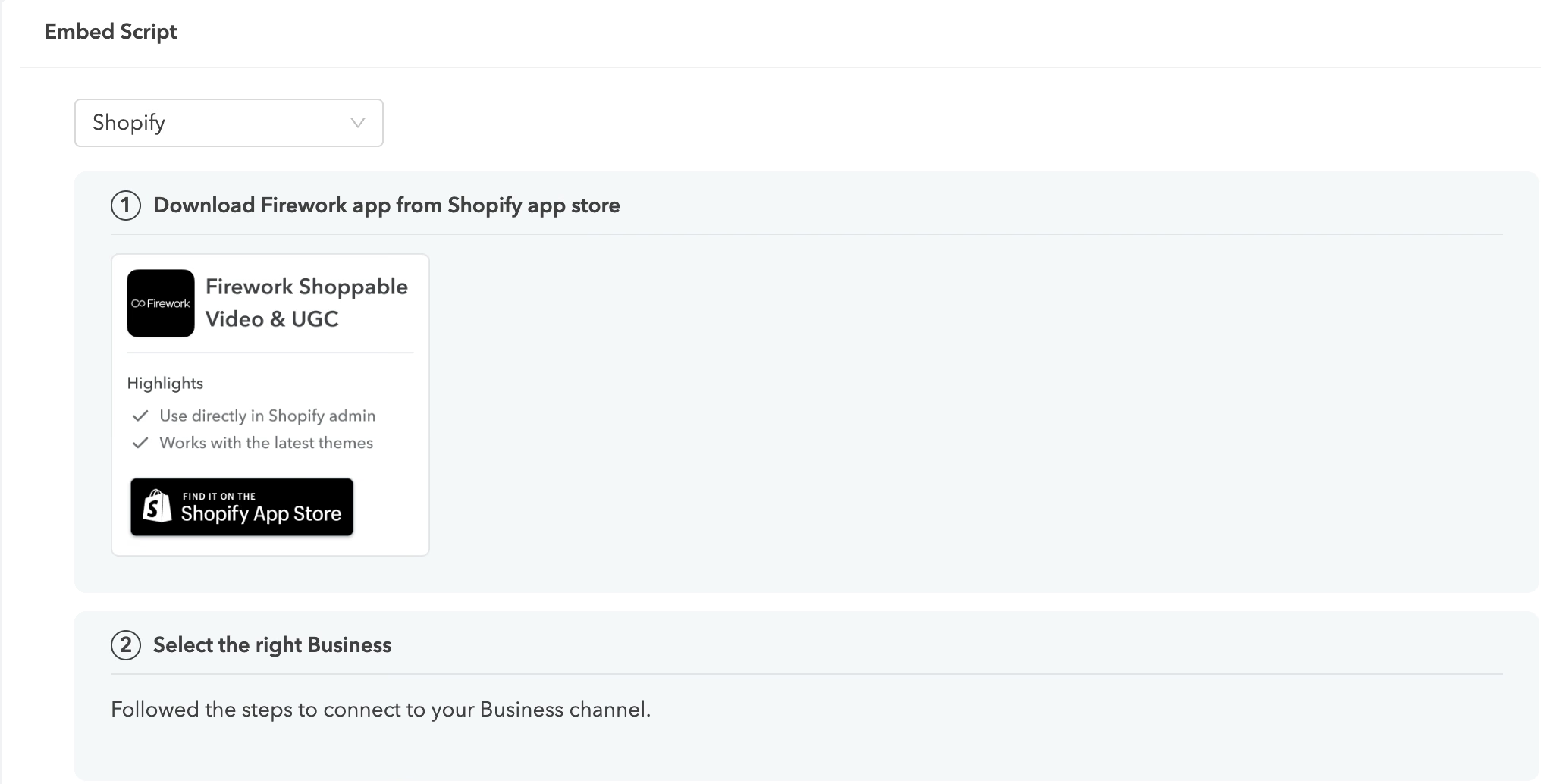
Shopify手順ページの更新:埋め込みスクリプトのShopify設定手順ページが更新されました。
2024年8月28日
新しい着信音:訪問者からの着信時に新しい着信音が鳴るようになりました。
2024年8月21日
訪問者カメラアクセス:適切なタイミングでカメラアクセスを解放します。
訪問者のブロック:不快な体験を防ぐために訪問者をシャドウバンできます。
2024年7月16日
カスタマイズ可能なウェイティングリストメッセージ:訪問者がウェイティングリストのキューに入ったときに表示するメッセージを独自に設定できます。

営業時間(Work Hours):管理者が1対1ウィジェットの利用可能時間を設定でき、訪問者が通話可能な時間帯を把握できます。1対1のエージェント勤務時間を設定する方法

ウィジェットオフラインモード:設定に応じて、スケジュールや営業時間の表示オプションを切り替えられます。
2024年6月24日
テキストスニペット:
- エージェントがショートカットフレーズを使ってテンプレートメッセージにアクセスできます。テキストでの繰り返し返信を効率化します。
- フレーズを入力すると、選択したいメッセージが表示されます。テキストスニペットの設定方法
2024年6月11日
ウィジェット表示設定(Widget Visibility Settings):1対1ダッシュボードで、管理者が場所やURLに基づいてウィジェットを閲覧できるユーザーを設定できます。埋め込みスクリプトを変更せずに制御の幅が広がります。1対1ウィジェットの表示設定
2024年5月29日
- 自動メッセージトリガー:新しい訪問者がOTOウィジェットを見た際、エージェントが手動でアクションを起こさなくても自動的にメッセージテンプレートが送信されます。1対1チャットでの自動メッセージトリガーの活用

- ウェイティングリストでのアバター表示:(近日公開)ウェイティングリストで待機中の訪問者のアバター画像を表示します。
- NPSの調整:(近日公開)通話終了時に訪問者が回答するNPSのビジュアルを変更します。
2024年5月21日
- 管理パネル:管理者がアクティブおよびオンライン中のエージェントのステータスを確認できるビュー
- 設定ページのリデザイン:1対1ウィジェットの設定オプションを調整しました。リリースドキュメントに記載します。

2024年5月20日
チームダッシュボード:エージェントがオンラインになった時間とその時刻をマネージャーがリアルタイムで確認できます。

設定の更新:1対1ウィジェットの設定オプションを調整しました。
2024年4月22日
OTOインサイトへの新しいリクエスト指標タブ
リクエスト承認率とリクエストの発生元に関する詳細なインサイトを提供し、ブランドがエージェントとより効果的に分析・連携できるようにします。

2024年4月19日
マルチチャット:エージェントが複数のチャットスレッドを開始し、最近やりとりした訪問者のアクティブな受信トレイを保持できます。
キャパシティ設定:設定画面でウィジェットのキャパシティを設定できます。ウェイティングリストが上限に達したとき、「エージェント対応中」のメッセージ表示、スケジュールリンクの表示、または自動的にウィジェットを非表示にするかを選択できます。

2024年3月21日
SA(セールスエージェント)アプリでのライブフィードサポート:エージェントがモバイルアプリからフィードを購読・管理できます。

2024年3月11日
Calendlyスケジューリング:ショッパーがCalendlyの予約ページを開けるように、スケジューリングオプションとCalendlyを連携できます。

2024年2月6日
ファイルアップロード:エージェントと訪問者の両方がチャット内でファイルのアップロードに対応しました。
スケジューリング:訪問者が将来のコールバックをスケジュールできるオプションを表示します(リンクアウトオプションを活用)。「設定」ページの「連携」から設定できます。

2024年1月12日
- セールスエージェントモバイルアプリ:エージェントがモバイルアプリを使ってチャットや通話のサポートができるようになりました。
- ライブフィード:1対1ワークスペースのデザインを更新。以下のカテゴリーで事前設定されたリストビューをサポートします:
- URLパターン(特定のPDPや検索キーワードなど)
- デバイスタイプ
- IPベースの地域情報
2024年1月4日
不在着信ラベル:訪問者から着信があってエージェントが応答しなかった場合に不在着信ラベルが表示されます。エージェントが会話に参加するか、訪問者がサイトを離れるまで表示され続けます。

2023年12月11日
訪問者のブロック:訪問者詳細ページから、訪問者をブロックまたはブロック解除できます。ブロックされた訪問者はフィードの一番下に移動し、プロフィールがグレーアウトされます。通話やメッセージの通知も届かなくなります。
2023年12月5日
ウェイティングリスト:訪問者がエージェントに連絡すると、エージェントと繋がるまでキュー内の順番を確認できるウェイティングリストに入ります。主な変更内容:
- 訪問者がウィジェットを完全にクリックして開くと、キューに入ったことを知らせるメッセージがチャットに表示されます。

- 訪問者が1対1ウィジェットを最小化すると、キューの順番を示す番号が表示されます。
- エージェントと接続されると、「[エージェント名]と接続されました」というメッセージが表示され、通話またはチャットが始まります。
2023年10月11日
エージェントアイコン:プロアクティブなテキストメッセージを送信すると、メッセージの横にエージェントの画像が表示されます。

設定するには、ビジネスポータルの「プロフィール」から画像を追加してください。詳しい手順はこちらをご覧ください。
2023年10月24日
通知バー:訪問者詳細ビューから、受信したテキストメッセージや通話をページの上部に直接表示できるようになりました。表示される内容:
- シングル受信テキストメッセージ:ゲストIDとチャットに直接参加できるオプションが表示されます。

- シングル着信コール:ゲストIDと直接通話を開始できるオプションが表示されます。

- 複数のテキストメッセージまたは着信:表示オプションが現れ、エージェントは顧客リスト全体に戻ることができます。

**アクティブなセッション中の場合は、新しい訪問者に移動する前にセッションを終了するように求められます。
**自分より先に別のSAが着信会話を承諾した場合、別のエージェントが会話に参加したため、切り替えを禁止するメッセージが表示されます。
2023年10月12日
- 新しいメッセージプレビューデザイン:よりコンパクトで自然なデザインになり(エージェントのアバターを使用)、「オンライン中」の表示要素が追加されました。
- ウィジェットのオンラインインジケーター:エージェントが現在オンラインであることを示す緑色のドットがウィジェットのカバー画像に追加されました。

2023年10月3日
- クリック可能なリンク:チャット内でテキストとして送信されたURLを、顧客がクリックできるようになりました。
- エントリーポイント:CTA、メールCTA、ショート動画、広告CTAなど、さまざまな場所に1対1のバーチャルショッピングの導線を設定できます。詳しくはこちらをご覧ください。
2023年9月22日
- 1対1のバーチャルショッピング表示切り替え:1対1のバーチャルショッピングウィジェットは、エージェントがオンラインステータスをONに切り替えたときのみ表示されます。OFFに切り替えると、1対1ウィジェットは非表示になります。

2023年9月12日
- タイピングインジケーター:相手が入力中の場合、営業担当者の画面に「...」が表示されます。

- 訪問者リストのビジュアルヒント:ゲスト名の横に絵文字🐔が表示され、同じ訪問者をひと目で見分けやすくなります。ゲストIDと同様、同じ訪問者には常に同じ絵文字が表示されます。

- メッセージウィグル:営業担当者がメッセージを送信すると、一定時間が経過した後にメッセージプレビューが小刻みに揺れて、顧客の注意を引きます。