Fijar productos previamente con V2L
Aprenda a programar y organizar sus listados de productos con antelación con V2L


Crear una transmisión en vivo y anclar productos usando marcas de tiempo
1.Vaya al Portal de Negocios y haga clic en Crear nueva transmisión en vivo.
2.En Fuente de medios, seleccione Activo de medios y seleccione el video que desea transmitir.
3.Una vez creado el evento, vaya a la pestaña Producto y seleccione la tienda desde la que desea añadir productos para su transmisión en vivo.
4.Después de añadir sus productos, haga clic en Pre-anclar productos en el lado izquierdo para abrir la página de pre-anclaje de productos, donde puede anclar los productos para su transmisión en vivo.

5.Para añadir marcas de tiempo y productos, haga clic en el botón "+ Añadir acción" botón. Navegue hasta el momento deseado en el video para establecer las horas de inicio y fin; luego, haga clic en el icono de anclaje junto a la marca de tiempo para marcar ese momento específico. También tiene la opción de introducir manualmente la hora deseada.
6.A continuación, seleccione la opción Producto. Esta acción mostrará una lista de todos los productos que ha añadido, lo que le permitirá elegir los relevantes para su transmisión en vivo.
7.Una vez que seleccione el producto, haga clic en el botón "Añadir acción" para incluir productos adicionales. Tenga en cuenta que puede anclar un máximo de tres productos a la vez.
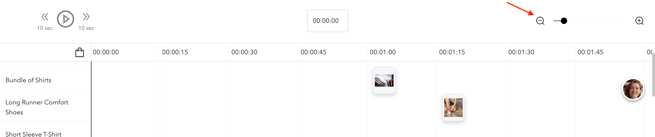
8.Los productos seleccionados aparecerán debajo de la marca de tiempo para facilitar la consulta. Además, puede ajustar la vista de la marca de tiempo utilizando la herramienta de zoom, lo que le permite acercar para una vista más detallada o alejar para una visión más amplia.
9.Haga clic en guardar una vez terminado; los productos se anclarán automáticamente según la marca de tiempo programada.