Exploration complète des PDP (Semi-automatisée)
Utilisez le crawling PDP semi-automatisé d'AVA pour extraire les FAQ et le contenu produit des pages de détail lors de l'importation, et ainsi enrichir automatiquement vos données produit.


Crawling complet des PDP permet à AVA d'extraire automatiquement du contenu textuel pertinent d'une page de détail produit (PDP) au moment de l'importation. Ce processus semi-automatisé enrichit vos données produit en capturant le contenu de la page qui pourrait être manqué lors des synchronisations standard via API ou webhook.
Aperçu du crawling complet des PDP
- Pour commencer, cliquez sur Produits puis cliquez sur Ajouter un produit (+) pour importer dans AVA.
- AVA va automatiquement explorer la PDP (si disponible) pour récupérer les FAQ et les tableaux comparatifs
- Le statut du processus de crawling s'affichera une fois terminé.

- La sélection de cette option affichera le contenu détaillé de la page web, y compris les comparaisons et les FAQ disponibles.
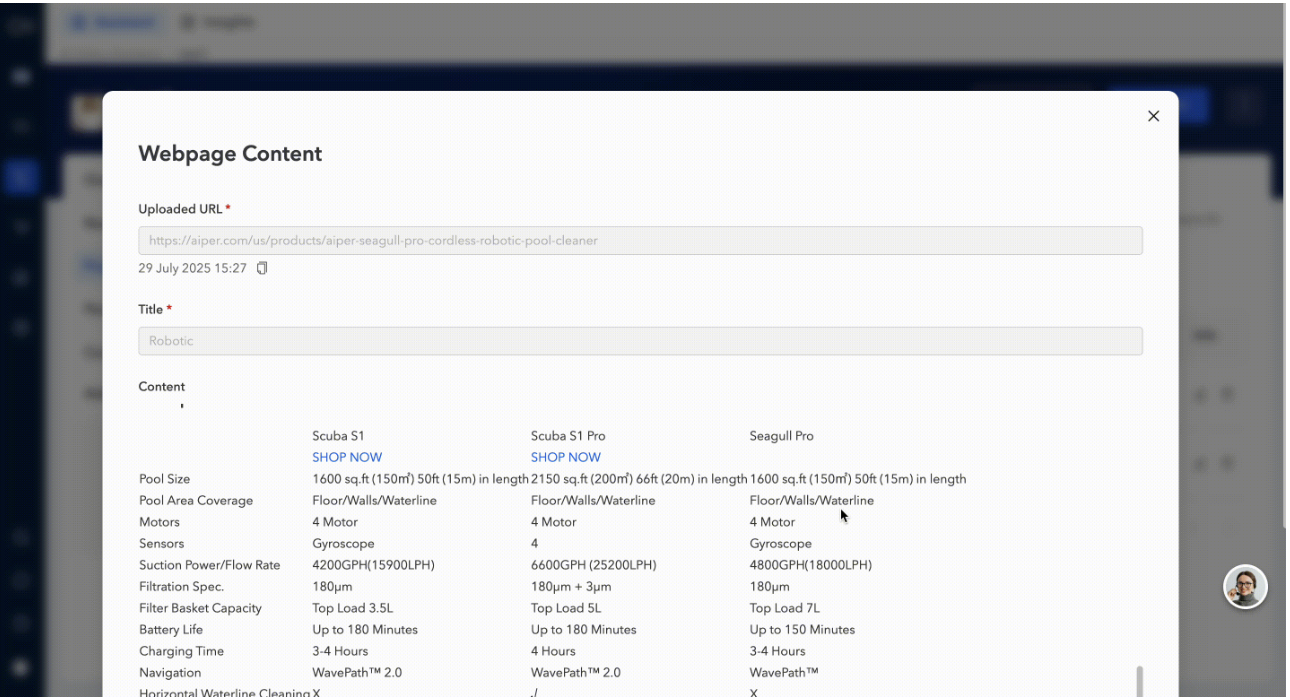
- Lors de l'importation d'un produit dans AVA, le crawling complet des PDP capture tout le contenu textuel accessible trouvé sur la page de détail du produit (PDP).
Comment AVA traite le contenu des PDP
Remarque :
- Le contenu déjà importé via les tableaux de produits (par exemple, les mises à jour API ou webhook) est exclu des résultats du crawling pour éviter la redondance.
- Sortie en lecture seule : Le contenu exploré ne peut pas être modifié manuellement dans AVA