フルPDPクローリング(半自動)
AVAの半自動PDPクローリングを活用して、インポート時に詳細ページからFAQや商品コンテンツを抽出し、商品データを自動的に充実させます。


フルPDPクローリングにより、AVAはインポート時に商品の詳細ページ(PDP)から意味のあるテキストベースのコンテンツを自動的に抽出できます。
この半自動プロセスにより、APIやWebhookを介した通常の同期では見落とされがちなページ上のコンテンツを取り込むことで、商品データが充実します。
フルPDPクローリングの概要
- まず「商品」をクリックし、次に「商品を追加 (+)」をクリックしてAVAにインポートします。
- AVAは自動的にPDPをクロールし(利用可能な場合)、FAQや比較表を取得します。
- クロールプロセスのステータスは、完了後に表示されます。

- このオプションを選択すると、利用可能な比較やFAQを含む詳細なウェブページコンテンツが表示されます。
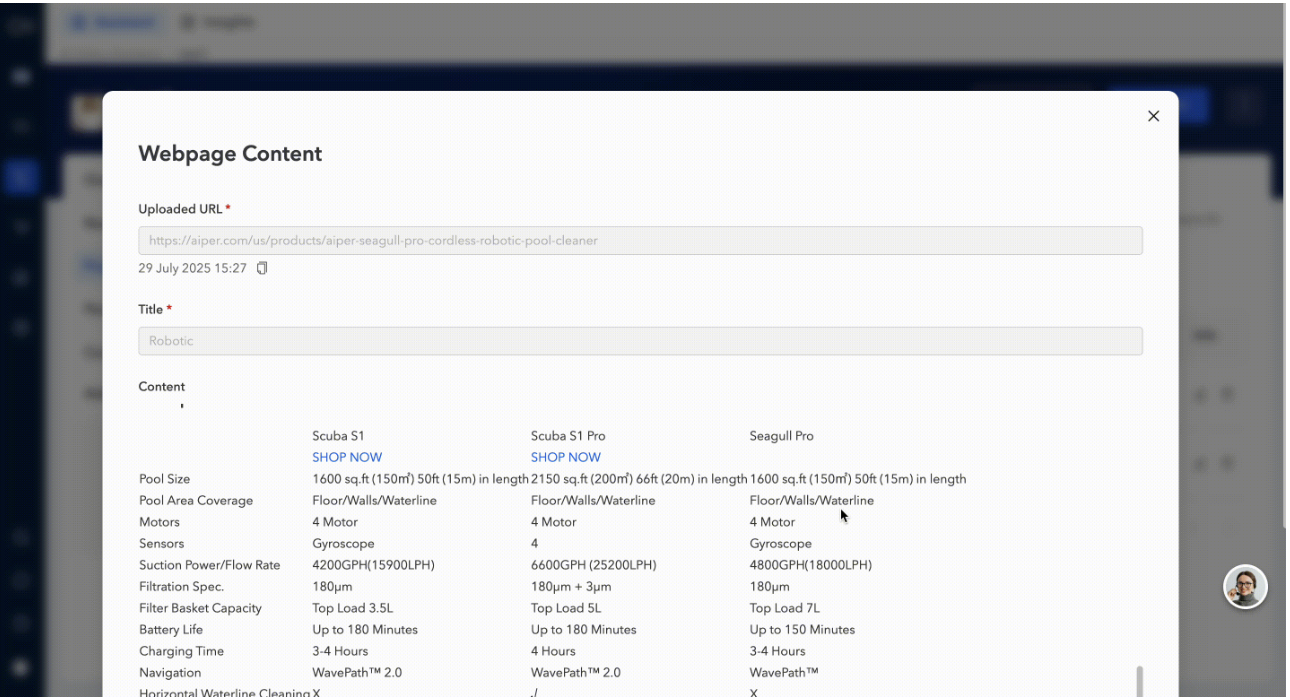
- 商品をAVAにインポートすると、フルPDPクローリングは商品詳細ページ(PDP)にあるアクセス可能なすべてのテキストベースのコンテンツを取り込みます。
AVAがPDPコンテンツを処理する方法
注:
- 商品テーブル(APIやWebhookによる更新など)を介してすでにインポートされたコンテンツは、重複を避けるためクロール結果から除外されます。
- 読み取り専用出力: クロールされたコンテンツはAVA内で手動で編集できません。