Zapierと1対1インテグレーションの活用
Zapierを活用して、1対1バーチャルショッピングと他のアプリ間で情報を連携させる方法を学びましょう。
Last updated:
March 4, 2025


始める前に、Zapierと1対1のさまざまな活用事例をご紹介します。
接続先として人気のプラットフォーム
メール
- Klaviyo
- Mailchimp
CRM
- Salesforce
- Hubspot
1対1の会話からどのような情報を収集すればよいですか?
- 名前
- メールアドレス
- チャット履歴
- 担当者メモ
情報の活用事例:
- Klaviyoメール自動化:会話終了後、または対応できなかった会話に対してフォローアップメールを送信します。
- CRMシステム連携:会話内容と担当者メモに基づいて訪問者情報を特定し、更新します。
ユーザー名を収集するZapierフローを作成する
この例では、ユーザー名を収集するZapの設定手順をご紹介します。
①「+ 作成」をクリックして、新しいZapを作成します。

②最初のノードでFireworkアプリを選択し、イベントとして「会話開始」または「会話終了」のいずれかを選びます。
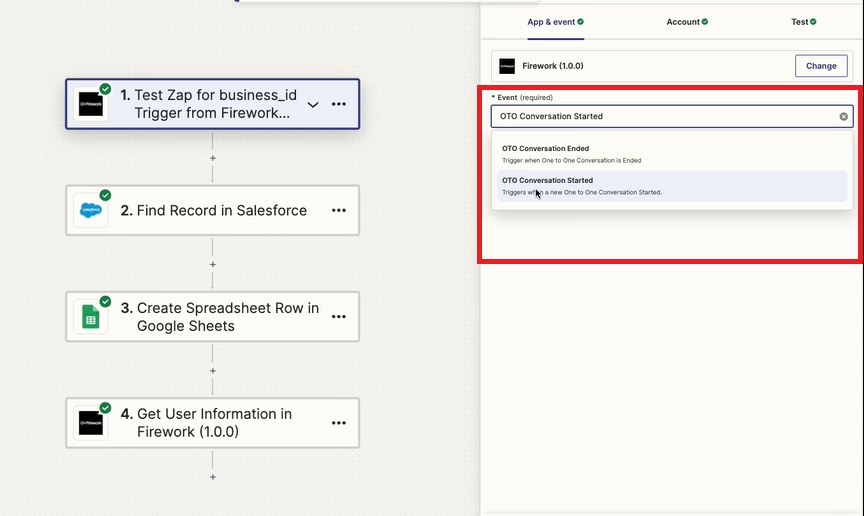
③「テスト」の項目で、イベントの結果(ここでは顧客のメールアドレスの受信)を設定し、変更を保存します。

④次のノードでCRMを接続し、メール受信および1対1の会話内容を共有するために必要な項目を入力して、変更を保存します。

⑤スプレッドシートノードを追加して情報を収集します。
⑥その情報をFirework 1対1ダッシュボードに送り返します。「ユーザー情報を取得」を選択します。

⑦「アクション」の項目で、これらの情報をCRMにマッピングし、保存します。

会話メモを追加するZapierフローを作成する
①新しいZapを設定し、Fireworkアプリで「会話終了」を選択します。

②2つ目のノードでCRMを選択し、「レコードを検索」を選択して顧客情報を見つけます。
③3つ目のノードで「メモを作成」を選択します。これにより、1対1チャットの要約がその顧客レコードに紐付けられてCRMに送信されるよう設定されます。
